 22 Maths tools #
These functions maps 2D input to a 2D output and are mostly space transformations (mirroring, rotations, tiling etc) or distortions (displacements, complex transforms, warpings etc). Transforming space on top of the tree will alter the geometry of any components below. Some like "22 edge logic" are actually more like 2 combined 21 tiles, one that outputs one type of values in X and another in Y.
Some of these components can also act as two parallel 1D filters.
A good way to see what effect these functions have on a system is to use a basic structure where a 2D Vector function distorts a picture.
An essential in-depth discussion of ArtMatic structures Trees and components is found in ArtMatic Designer References and in Building trees.
22 Maths tools #
ArtMatic script function :
parameters :
A : Scale (-25.0 : 25.0)
B : Rotation (-360.0 : 360.0) angle in degree
C : Offset x (-25.0 : 25.0) E9 options
D : Offset y (-25.0 : 25.0) E9 options
discussion :
Many useful 2D space transforms are provided as various algorithm in the 2D Maths tools tile.
 22 Scale Ax, By
ArtMatic script function :
parameters :
A : Scale x (-10.0 : 10.0) E9 options
B : Scale y (-10.0 : 10.0) E9 options
discussion :
This simple primitive scales the two inputs independently. The scale parameters have a greater range than the similar Scale and Offset function. Note that the x output is solely a function off the x input, and the y output is solely a function of the y input, Hence, this component can be used as either a space transform function OR as two parallel 1D filters. When used as a space transform, this component acts as a magnification function.
Left output : A * x
Right output: B * y
 22 Scale & Offset
ArtMatic script function :
parameters :
A : Scale (-16.0 : 16.0) E9 options
B : Offset x (-32.0 : 32.0) E9 options
C : Offset y (-32.0 : 32.0) E9 options
discussion :
The Scale & Offset component simply scales the incoming space (by multiplying the x and y coordinates by the same factor) and allows it to be offset horizontally ( the 'Offset x' parameter) and/or vertically (the 'Offset y' parameter). Note that a scale value of -1 inverts the space. Since the x output is a function of the x input and is not influenced by the y input, this component can be used as two parallel 1D scaling filters.
To combine scaling rotations and translation use the affine transforms at Maths tools #.
Left output: (A * x) + B
Right output: (A * y) + C
 22 Rotate
ArtMatic script function :
parameters :
A : Angle (-180.0 : 180.0) E9 options
B : Center x (-32.0 : 32.0) E9 options
C : Center y (-32.0 : 32.0) E9 options
discussion :
Rotate space about a point set by 'Center'. The 'Angle' parameter is the angle of rotation that can be set in radian or degree depending on the chosen option. Existing values are remapped when changing the 'Angle' unit. 'Center x' and 'Center y' set the point about which the space is rotated. The default center is 0,0. If the canvas view has been shifted the resulting rotation will not be centered.
To combine scaling rotations and translation use the affine transforms at Maths tools #.
Script examples:
explicit:
implicit:
 22 Skew
ArtMatic script function :
parameters :
A : Skew Angle (-180.0 : 180.0) E9 options
B : Skew Amount (-2.0 : 2.0)
C : Scale (-4.0 : 4.0) E9 options
discussion :
Skew skews the incoming space. The 'Skew Angle' parameter determines the angle of the skewing. 'Skew Amount' influences the amount of skewing, and 'Scale' zooms the space.

 22 Normalise
ArtMatic script function :
parameters :
A : Magnitude (0.125 : 8.0)
discussion :
This is a mathematical primitive that normalizes the incoming 2D vector(x,y) by dividing it with its length (which sets it to 1). Normalisation is mandatory when computing dot products for illumination but it can be used also to create non linear mappings and space distortions effects.
 22 Edge Logic #
ArtMatic script function :
parameters :
A : Offset y (-10.0 : 10.0)
B : Edge height (0.0 : 10.0) E9 options
C : Edge width (0.0 : 10.0) E9 options
D : Smoothness % (0.0 : 10.0)
discussion :
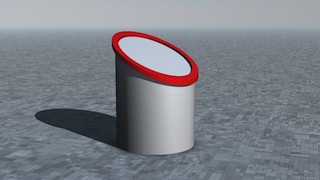
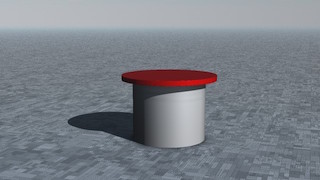
Various logic tools have the option to create an edge at the intersection in boolean operations. But it is often useful to get the edge independently so they can be shaded separately.
The 22 Edge Logic tool sends the edge distance field (DF) on the first output and the boolean operation on the second.
This order is consistent with other 3D objects that sends 2 outputs like DF Polyhedrons #, Buildings, DF Constructs # and DF Cities #.
The 42 "logic tools" introduced in AM 7. 0 can be used to mix various 2 DF Edge logic outputs.
Parameters :


 22 Undulations
ArtMatic script function :
parameters :
A : Amplitude x (-4.0 : 4.0)
B : Amplitude y (-4.0 : 4.0)
C : Frequency (-32.0 : 32.0)
D : Phase (-32.0 : 32.0)
discussion :
22 Undulations displace space using sine waves, thus "undulating" the coordinates. When the 'Amplitude' is 0, space is not distorted. In 8.08 amplitudes can be set for X and Y axis separately. A great variety of space distortions and patterns can be generated by adjusting the amplitudes and frequency. In 8.08 the phase parameter allow to animates the undulations and the Frequency parameter has the usual frequency options settings. In DF modes the frequency adjust the amplitudes to make the transform compatible with DF modeling. Low frequency DF undulation can be used for example to curve a DF city for 3D rendering in ArtMatic Voyager.

 22 Waves
ArtMatic script function :
parameters :
A : Frequency (-2.0 : 2.0)
B : Amplitude x (-2.0 : 2.0)
C : Amplitude y (-2.0 : 2.0)
discussion :
This component bends space giving it a "waved" aspect. The distortion is created using the absolute value of the sine function. 'Frequency' determines the spacing of the undulations. The amplitude parameters determine the amount of horizontal and distortion.

 22 Sin warp
ArtMatic script function :
parameters :
A : Amplitude (-6.0 : 6.0)
B : Frequency (-6.283 : 6.283)
discussion :
This component is very similar to the x*A sin y/y*A sin x component and bends space with waves or an eggcrate-like effect.
 22 Sin x, sin y
ArtMatic script function :
parameters :
A : Amplitude (-8.0 : 8.0)
B : Frequency (0.0 : 16.0)
discussion :
This component tiles space by applying the sine function to the incoming values. The function's output always falls in the range of -1 to 1. This is a great way to create tiles and other repetitive patterns and textures.
The output of this function is both periodic and continuous, thus it is often used for sound design.

 22 Hexagonal Sin
ArtMatic script function :
parameters :
A : Scale (0.500 : 8.0)
discussion :
Like Sin x, sin y, this component tiles space. In this case, space is tiled using a combination of sin and hexagonal transforms. The output of this function is both periodic and continuous, thus it is often used for sound design.

A plane and a rotating line passed through the Hexagonal Sin space.
 22 Orthogonal Tiles #
ArtMatic script function :
parameters :
A : Scale (0.0 : 16.0)
C : Frequency (0.0 : 10.0) E9 options
discussion :
Orthogonal Tiles # provides several methods for tiling space. The parameters are algorithm dependent. 'Frequency' sets the tile size and leaves the coordinates of each tile unchanged and centered at 0. The 'Scale' parameter scales the space in the tiles with 1 being no change. When Scale Y is present in the rectangle algorithms it can adjust the aspect ratio.
Tip: To create complex symmetry, follow this component with the Mirrors 4 component.
Warning: The output is highly discontinuous and is to be avoided in systems destined for ArtMatic Voyager.
 22 Orthogonal Mirror Tiles
ArtMatic script function :
parameters :
A : Frequency (0.0 : 32.0) E9 options
B : Aspect ratio (0.0 : 2.0)
discussion :
The input space is mirrored both vertically and horizontally and then tiled which makes it ideal for creating tiled wallpaper or kaleidoscope type effects. (For creating individual tiles for export, the Mirrors 4 component may be more appropriate.)
In E9 the old 'Scale' parameter has been renamed frequency to ease alignement with other tiling functions.
To keep the same behavior as before just use 1/f parameter option.
Parameter 'Scale' is applied both horizontally and vertically. Parameter 'Aspect ratio' applies only vertically and can be used to achieve rectangular mirrors tilings.
 22 Other Tiles #
ArtMatic script function :
parameters :
A : Amplitude (0.0 : 8.0)
B : Rotation (-180.0 : 180.0) angle in degree
C : Frequency (0.0 : 10.0)
discussion :
This component provides a collection of periodic regular tilings. 'Amplitude' scales the space in each tile while 'Rotation' rotates it. 'Frequency' sets the period of the tiling.

 22 Mirrors N Tiles #
ArtMatic script function :
parameters :
A : Frequency (0.0 : 16.0) E9 options
B : Phase (-10.0 : 10.0) E9 options
discussion :
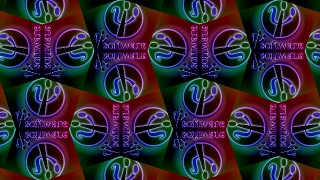
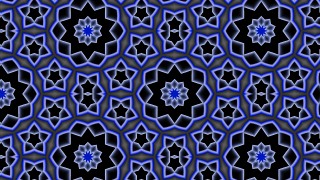
Mirrors N Tiles implements a series of tiling with mirror symmetries around the edges. Parameters will vary with algorithms.
The tilings are periodic and many uses N rotational foldings. The 'Phase' parameters moves the Y coordinate in the given orientation options.
In E9 the old 'Tile size' parameter has been renamed frequency to ease alignement with other tiling functions. Use it with 1/value to sets the period of the tiling if needed.
The "60 degrees" means the underlying lattice is a triangular lattice.
The "45 degrees" means lattices cell centers are spaced at 45°
"skewed 36" refers to a skewed lattice with a ratio of tan(36°) between x and y while "skewed 72" to a ratio of tan(72°)
The last 4 algorithms provides semi-regular mirror tilings of several polygons.
The Options popup allows to set the mirrors orientations.


 22 Pixel prism
ArtMatic script function :
parameters :
A : Displacement (-4.0 : 4.0)
B : Scale (-4.0 : 4.0)
C : Frequency (-4.0 : 4.0)
discussion :
Pixel Prism rearranges space by randomly breaking up the incoming space into little squares of uniform size. The effect is puzzle-like. To best visualize it, use the Movie or pict component after it as in the images below. With displacement at 0 and scale at 0, there is no re-arrangement of the incoming space though there may be tiling (depending on the setting of the frequency parameter which determines the size of the squares).
Warning: The output is highly discontinuous and is to be avoided in systems destined for ArtMatic Voyager.
Example: Pixel Prism with Displacement set high completely scrambles the geometry of XY space.

 22 Crystallize
ArtMatic script function :
parameters :
A : Amplitude (0.0 : 1.0)
B : Frequency (0.0 : 16.0)
C : Phase (-16.0 : 16.0)
discussion :
Deforms space in a painterly way that makes it great for creating stylization effects for video processing. The image below demonstrates its effect on the U&I Software logo.

Warning: The output is highly discontinuous and is to be avoided in systems destined for ArtMatic Voyager.
 22 Disk Tiling
ArtMatic script function :
parameters :
A : Smooth Edges (0.0 : 1.0)
B : Offset x (-4.0 : 4.0)
C : Offset y (-4.0 : 4.0)
discussion :
Warp space with an Escher-like tiling of space into a disc-shaped enclosed space. The Tiling uses N Rotations folding with N increasing towards the edges.
This is a great primitive for creating decorative figures.
 22 Sierpinsky tiles
ArtMatic script function :
parameters :
A : Amplitude (0.0 : 8.0)
B : Offset (-4.0 : 4.0)
C : Frequency (0.0 : 8.0)
discussion :
Sierpinsky tiles coming soon
 22 Ripples
ArtMatic script function :
parameters :
A : Frequency (-6.283 : 6.283)
B : Amplitude (-2.0 : 2.0)
C : Phase (-32.0 : 32.0)
discussion :
This component distorts space with concentric circles. 'Amplitude' provides the amount of distortion. With an amplitude of 0, there is no distortion. 'Frequency' determines the spacing of the ripples. For a realistic effect you can use the 'Phase' parameter to animate outward ripples.

 22 Split & Move
ArtMatic script function :
parameters :
A : Angle (-3.142 : 3.142)
B : Offset x (0.0 : 10.0) E9 options
C : Offset y (0.0 : 10.0) E9 options
discussion :
Splits the incoming space (plane) in two and moves each side in opposite directions. Infinity is generated in the space between the split planes so that the output of this component can be used as a mask for wipe effects.
 22 infinity disk gate
ArtMatic script function :
parameters :
A : Limit (-1.0 : 64.0) E9 options
discussion :
Modified in ArMatic engine 8.07, this component generates infinity values or remove infinities according to the following algorithms :
 22 Mirror
ArtMatic script function :
parameters :
A : Rotation (-180.0 : 180.0) E9 options
B : Offset x (-50.0 : 50.0) E9 options
C : Offset y (-50.0 : 50.0) E9 options
D : Smoothness % (0.0 : 1.0)
discussion :
Mirrors N Tiles implements a series of tiling with mirror symmetries around the edges. Parameters will vary with algorithms.
The tilings are periodic and many uses N rotational foldings. The 'Phase' parameters moves the Y coordinate in the given orientation options.
In E9 the old 'Tile size' parameter has been renamed frequency to ease alignement with other tiling functions. Use it with 1/value to sets the period of the tiling if needed.
The "60 degrees" means the underlying lattice is a triangular lattice.
The "45 degrees" means lattices cell centers are spaced at 45°
"skewed 36" refers to a skewed lattice with a ratio of tan(36°) between x and y while "skewed 72" to a ratio of tan(72°)
The last 4 algorithms provides semi-regular mirror tilings of several polygons.
The Options popup allows to set the mirrors orientations.
 22 Mirrors 3
ArtMatic script function :
parameters :
A : Scale (-4.0 : 4.0) E9 options
B : Offset x (-8.0 : 8.0) E9 options
C : Offset y (-8.0 : 8.0) E9 options
discussion :
Mirror space into three parts with a 120 degree rotational symmetry. Use this and the other "mirror" components for kaleidoscopic effects. 'Scale' scales the incoming space and the offset parameters provide horizontal and vertical offsets of the resulting space. 'Offsets' are applied after the mirroring.
 22 Mirrors 4
ArtMatic script function :
parameters :
A : Scale (-4.0 : 4.0) E9 options
B : Offset x (-8.0 : 8.0) E9 options
C : Offset y (-8.0 : 8.0) E9 options
discussion :
This component returns ABS(x),ABS(y) which mirror the incoming space to make it symmetrical about the x and y axes. It has no option and uses a simple absolute value with optional scaling. Keep 'Scale' at 1 for strict mirroring and DFRM compatibility.'Offsets' are applied after the mirroring. To mirror a single axis you can use the 11 Abs x component.
Use N-Fold Mirrors with N=4 when mirror orientation is required.
 22 N-Fold Mirrors #
ArtMatic script function :
parameters :
A : Scale (-10.0 : 10.0) E9 options
B : Offset x (-50.0 : 50.0) E9 options
C : Offset y (-50.0 : 50.0) E9 options
discussion :
This component provides a number of different mirroring algorithms involving N rotational mirrors. Parameters options are available for all folding symmetry orientation options. Various algorithms basically sets the number of rotational symmetries. 'Offsets' are applied after the mirroring. Keep 'Scale' at 1 for strict mirroring and DFRM compatibility.
In E9 the old Scale (period) has been renamed frequency to ease alignement with other tiling functions.
To keep the same behavior as before just use 1/f parameter option.

 22 Branch N
ArtMatic script function :
parameters :
A : Branch number (1 : 50) integer
B : Offset x (-8.0 : 8.0) E9 options
C : Offset y (-8.0 : 8.0) E9 options
D : Smoothness % (0.0 : 8.0)
discussion :
Branch N mirrors space as in the other "mirror" tiles but provides parametric control of the number of rotational folding mirrors as well as choices of mirror orientations. The 'Branch number' 'parameter allows you to achieve from 2 to 50 rotational symmetries. Unlike the other mirror functions, the axis symmetry can be made seamless (continuous) using the 'Smoothness' parameter which allows to create continuous surfaces. The 'offset x' and 'offset y' parameters are the horizontal and vertical offsets of the output mirrored space.
Parameter options provide a number of different symmetries. When inward is chosen, the orientation matches the one used by 3D Mirrors & Rotates # .
 22 Radialstar
ArtMatic script function :
parameters :
A : Outer phase (0.0 : 12.566)
B : Narrowness (0.0 : 1.0)
C : Amplitude (0.0 : 8.0)
discussion :
This component distorts space continuously with radial undulations centered around origin. 'Amplitude' controls amount of displacement. Animate the outer phase parameter for nice explosion effects.
 22 Disk Mirror
ArtMatic script function :
parameters :
A : Disk Size (0.250 : 50.0)
B : Mirror concavity (0.0 : 1.0)
C : Offset y (-8.0 : 8.0) E9 options
D : Offset x (-8.0 : 8.0) E9 options
discussion :
Disk Mirror provides a circular mirroring of the incoming space. This is another component that can be used to constrain space to prevent it from reaching infinity. The 'Disk Size' parameter controls the radius above which the space is mirrored. 'Offset' x and y controls the center of the mirroring disk.
When 'Mirror concavity' is close to 1 the mirror reflects the inside and values in-between will distort the space to blend between orientations. Keep it at zero for a strict circle inversion.

 22 Distance Mirror
ArtMatic script function :
parameters :
A : Amplitude (0.0 : 2.0)
B : Mirror distance (0.0 : 24.0)
discussion :
This component inwardly mirrors distance beyond a certain radius and hence is another component that can be used for avoiding infinities. Unlike Disk mirror the inversion of space is made progressive and continuous, hence it is not strictly speaking a mirroring function. The space inside the distance given by 'Mirror distance' parameter is left unmodified.
 22 Disk Inverse Ring
ArtMatic script function :
parameters :
A : Disk number (2 : 12) integer
B : Scale (-8.0 : 8.0)
C : Offset y (-1.0 : 1.0) E9 options
discussion :
Mirrors the 2D space with a set of N tangents Mirroring circles arranged in a ring. 'Disk number' sets the number of disk mirrors while 'Scale' controls their radius and the underlying ring radius. When applied recursively disk inversions may creates fascinating fractals. 'Offset y' offsets the radius of an overall disk mirror that can go outward when positive or inward when negative. In general you will keep y at -1 (regions outside the overall disk mirror the inside), or 0,1 (regions inside the overall disk mirror the outside);
 22 Complex inverse
ArtMatic script function :
parameters :
A : Scale (0.031 : 2.0)
B : Offset x (-32.0 : 32.0)
C : Offset y (-32.0 : 32.0)
discussion :
Complex inverse inverts space using the complex number division 1/Z, Z=(x+iy). The transformation divides (x,y) by its squared distance to zero so that infinity becomes (0,0) and (0,0) is mapped to infinity.
The Complex inversion has the remarkable property to transform lines into circles.
See also Complex Division.
Note : the euclidian distance or length(x,y) is also called the magnitude of the complex x+iy.
 22 Complex Moebius
ArtMatic script function :
parameters :
A : Angle (-6.283 : 6.283)
B : Scale (-4.0 : 4.0)
C : Imaginary (-4.0 : 4.0)
discussion :
Complex Moebius is a space transform based on the division of two complex polynomials (AZ+B/CZ+D). When used in an iterative (looped) system the result is fascinating geometries that sometimes have several attractors. See the 25 Components chapter for examples of other
Moebius transforms.
 22 Complex Map
ArtMatic script function :
parameters :
A : Real (-2.0 : 2.0)
B : Imaginary (-2.0 : 2.0)
discussion :
Complex Map transforms the 2D space with several iterations of the complex equation C(Z+1/Z) with C constant determined by the parameter A and B (C=A+iB). Z is set by the x,y inputs as the real and imaginary parts of a complex number : Z = x+iy.
 22 Complex Map 2
ArtMatic script function :
parameters :
A : Real (-2.0 : 2.0)
B : Imaginary (-2.0 : 2.0)
discussion :
Complex Map 2 transforms the 2D space with several iterations of the complex polynomial ((Z^2 +C1) / (2Z + C2))^2. C1 and C2 are derived from the parameters A and B using C1=A-1+iB and C2=A-2+iB. This component treats the x,y inputs as a complex number Z with Z = x+iy.
 22 Complex waves
ArtMatic script function :
parameters :
A : Scale (0.0 : 4.0)
B : Offset (-2.0 : 2.0)
discussion :
This component warps the incoming space by applying a low frequency sine wave transform.
 22 Ring Space
ArtMatic script function :
parameters :
A : Offset x (-4.0 : 4.0)
B : Offset y (-4.0 : 4.0)
C : Warp (0.0 : 1.0)
discussion :
This component warps space about several attractors. As with many of the complex number-based components, this component can be used to avoid infinities. The presence of the three attractors makes this component terrific for creating flower-like shapes.
 22 Polar Space
ArtMatic script function :
parameters :
A : Polar scale (0.500 : 32.0) E9 options
B : Distance scale (-32.0 : 32.0)
C : Phase x (-3.142 : 3.142)
discussion :
Use this component to interpret x and y as polar coordinates where x is the angle and y is distance.
In version 1.5 Polar Space has a new set of option that makes it easier to map various patterns seamlessly when setting the scale:Polar space options
 22 Orbiters
ArtMatic script function :
parameters :
A : Rotation (-2.0 : 2.0)
B : Offset (-2.0 : 2.0)
C : Level (-2.0 : 2.0)
discussion :
This is a complex component that re-arranges space into a set of hierarchical cells, each with its own coordinate system, rotating around the center larger cell. The 'Level' parameter controls the size of each cell while 'Rotation' animates the system and makes cells further apart. Space is blended between cells coordinates which creates a smooth distorted geometry.
The easiest way to see how this component re-arranges space is to follow it with the Movie/Pict component.
Example : Libraries/Components demo/22 Orbiter.artm
 22 Twirl
ArtMatic script function :
parameters :
A : Scale (0.0 : 1.0)
B : Angle (-4.0 : 4.0)
discussion :
Twirl distorts space with a whirlpool pattern.
 22 Multi twirls
ArtMatic script function :
parameters :
A : Frequency (0.062 : 4.0)
B : Phase (-4.0 : 4.0)
C : Twirl (0.0 : 8.0)
discussion :
Multi twirls distorts space with randomly placed whirlpools. This is a great component for distorting pictures especially when creating animation. This component may also be used to create storm structures on a planet atmosphere or ArtMatic clouds layers for ArtMatic Voyager.

 22 Tech displace
ArtMatic script function :
parameters :
A : Displacement (0.0 : 4.0)
B : Phase (-16.0 : 16.0)
C : Frequency (0.0 : 4.0)
discussion :
A displacement map with a sparse geometric texture. 'Displacement' controls the amount of distortion while 'Frequency' sets the displacement texture scale.
Example: A square grid displaced by "tech Displace".

 22 Tech quantize
ArtMatic script function :
parameters :
A : Displacement (0.0 : 1.0)
B : Phase (-16.0 : 16.0)
C : Frequency (0.0 : 4.0)
discussion :
"Tech quantize" uses a random arrangement of 45-degree orthogonal patterns to quantize the input, creating mosaic effects.
Warning : The output space is highly discontinuous and is to be avoided for terrains & volumes design.

 22 Random #
ArtMatic script function :
parameters :
A : Amplitude (-4.0 : 4.0)
B : Phase (-32.0 : 32.0) E9 options
C : Frequency (-32.0 : 32.0)
discussion :
This component provides two narrow band random functions of the (x,y) space.
the 'Amplitude' value controls the scale of the output noise.
The result can be used as displacement or as dual function generation depending on the algorithm, available since E9.
It can be generated implicitly in the script language with random(X,Y,Z).
Script example: use random for x & y separately
vec1 fb = TechNoise.signs_sharp(X,vra.y);
vec1 fc = PictMovie(vra.x,Y);
vec1 fout1 = mix(fb,fc,0.75);
 22 Random Fractal Space
ArtMatic script function :
parameters :
A : Amplitude (0.0 : 32.0)
B : Phase (-32.0 : 32.0) E9 options
C : Frequency (0.0 : 32.0)
D : Roughness (0.200 : 0.800)
discussion :
This noise function outputs a 2D vector valued fractal noise. Unlike the other noise functions, Random Fractal Space is not a displacement which results in the new coordinates being truly random. Place this component before a Grid to create veined textures, or place it before any other surface generator to create beautiful random textures. As usual 'Roughness' parameter controls the fractal dimension.
'Frequency' has the usual frequency options settings.
Script examples:
 22 Low Freq randomize
ArtMatic script function :
parameters :
A : Amplitude (0.0 : 8.0)
B : Phase (-8.0 : 8.0)
C : Frequency (0.0 : 16.0)
discussion :
"Low Freq Random" displaces the (x,y) space with a narrow band low frequency noise. 'Amplitude' controls how much coordinates are displaced.
See also the 21 Low Freq noise tile.
 22 Perlin displace
ArtMatic script function :
parameters :
A : Amplitude (0.0 : 4.0)
B : Phase (-32.0 : 32.0)
C : Frequency (0.0 : 32.0)
discussion :
A Perlin noise-based component that combines the output of two uncorrelated Perlin Noise functions for each output to displace the input space. The 'Amplitude' parameter controls the amount of displacement of the incoming values. 'Phase' offsets the noise in x.
'Frequency' has the standard frequency options and controls the scale of the noise.
 22 Multi Perlin displace
ArtMatic script function :
parameters :
A : Amplitude (0.0 : 4.0)
B : Octaves (1.0 : 128.0)
C : Frequency (0.0 : 32.0)
D : Roughness (0.125 : 0.750)
discussion :
To displace the input space, "Multi Perlin displace" uses two uncorrelated Multi-Perlin noises functions for each coordinates. The Multi-Perlin noise sums Perlin Noise functions at various frequencies according to the 'Octaves' parameter.
The 'Amplitude' parameter controls the amount of displacement.
'Frequency' has the standard frequency options and controls the scale of the noise. 'Roughness' controls the fractal dimension and has a visible effect only when octaves is above 2.
 22 Turbulence
ArtMatic script function :
parameters :
A : Amplitude (-2.0 : 2.0)
B : Phase (-32.0 : 32.0) E9 options
C : Frequency (0.0 : 32.0)
D : Roughness (0.250 : 0.650)
discussion :
This is a 2D fractal displacement function whose 'Amplitude' parameter controls the amount of displacement added to the input space. This component is great for creating turbulence, fire, marble and clouds. 2D Turbulence is based on two parallel fractal noises. See the notes for 21 fractal noise to learn more about fractal noises.
"2D turbulence" is sensitive to the Max iterations for fractals preference, as most fractal noises/displacement functions.
The 3D equivalent of this component can be found at 32 Turbulence 3D .
'Frequency' has the standard frequency options while 'Roughness' controls the fractal dimension.
 22 Time turbulence
ArtMatic script function :
parameters :
A : Amplitude (0.0 : 8.0)
B : feedback (-8.0 : 8.0)
C : Frequency (0.0 : 32.0)
D : Pace (0.0 : 8.0)
discussion :
"Time turbulence" is similar with 2D turbulence described above but with time causing automatic phase shift. This function is unusual in that it is sensitive to the flow of time -- even with its parameters locked and without keyframes. It is a great primitive for creating flow and smoke effects for animation and video processing. 'Amplitude' controls the amount of displacement of the input values.
The 'Feedback' parameter loops the system so that lower frequencies distorts higher ones according to feedback values when non-zero.
'Pace' controls the speed of the time-induced animation.
'Frequency' has the standard frequency options settings.
 22 MultiFractal displace
ArtMatic script function :
parameters :
A : Amplitude (0.0 : 2.0)
B : Smoothness % (0.0 : 1.0)
C : Frequency (0.0 : 32.0)
D : Roughness (0.200 : 0.800)
discussion :
A 2D fractal displacement noise created by summing vector-valued Perlin noise functions of varying fractal dimension (roughness). "Multi-Fractal" describes fractals with varying fractal dimension (a measure of the surface roughness). See the scalar version of MultiFractal noise.
Multi Fractal displace creates rich and natural textures - especially when used in ArtMatic Voyager. 'Amplitude' controls the amount of displacement of the input values. Smoothness controls the roughness of the displacement texture.
'Frequency' has the standard frequency options while 'Roughness' controls the fractal dimension.

A Multi-Fractal displaced cone rendered in ArtMatic Voyager.
 22 Ridged Fractal displace
ArtMatic script function :
parameters :
A : Amplitude (0.0 : 2.0)
B : Phase (-32.0 : 32.0)
C : Frequency (0.0 : 32.0)
D : Roughness (0.250 : 0.750)
discussion :
A multi-fractal 2D vector function based on a "ridged" version of the Perlin noise function as discussed in the 2D Scalar (21) components chapter. See 21 Ridged Fractal noise. 'Amplitude' controls the amount of displacement of the input space.
'Frequency' has the standard frequency options while 'Roughness' controls the fractal dimension.
 22 Chaos displace A
ArtMatic script function :
parameters :
A : Amplitude (0.0 : 1.0)
B : Feedback (-1.0 : 1.0) E9 options
C : Frequency (0.0 : 32.0)
D : Roughness (0.250 : 0.750)
discussion :
A composite multi-fractal displacement function based on a cubic-clipped Perlin noise function. 'Frequency' has the usual frequency options settings while 'Roughness' controls the fractal dimension.

Chaos displace can turn a simple cone into a rich featured island.
 22 Chaos displace B
ArtMatic script function :
parameters :
A : Amplitude (0.0 : 2.0)
B : Feedback (-1.0 : 1.0) E9 options
C : Frequency (0.0 : 32.0)
D : Roughness (0.250 : 0.750)
discussion :
A composite multi-fractal displacement function based on an algorithm similar the 21 Bubble Rock component. As with Chaos displace A it can turn simple surface into highly complex fractal terrains.
'Frequency' has the usual frequency options settings.
 22 Crystal displace
ArtMatic script function :
parameters :
A : Amplitude (0.0 : 8.0)
B : Phase (-16.0 : 16.0)
C : Frequency (0.0 : 32.0)
D : Roughness (0.250 : 0.750)
discussion :
A fractal displacement function based on a triangular lattice random linear noise. Crystal Displace is discontinuous and will produce sharp edges when used in ArtMatic Voyager. The 'Roughness' parameter controls the fractal dimension as with other fractal noises.
'Frequency' has the usual frequency options settings.
 22 Spots displace
ArtMatic script function :
parameters :
A : Displacement (0.0 : 8.0)
B : Phase (-32.0 : 32.0)
C : Frequency (0.0 : 8.0)
discussion :
A displacement function comprised of randomly sized bumps placed in an infinite lattice. 'Displacement' controls the amount of space distortion while 'Frequency' and 'Phase' sets the underlying grid scale and translation in x.

 22 Directional Random
ArtMatic script function :
parameters :
A : Amplitude (0.0 : 2.0)
B : Direction (-2.0 : 2.0)
C : Phase (-16.0 : 16.0)
discussion :
This component distorts the incoming 2D space in a particular direction provided by the 'Direction' parameter. When direction is 2 or -2, space is distorted vertically. When it is set to 0, the distortion is purely horizontal. In-between values, provide skewed distortion. 'Amplitude' controls both amplitude and frequency.
 22 Bubble Space
ArtMatic script function :
parameters :
A : Amplitude (0.0 : 2.0)
B : Bubble size (1.0 : 6.0)
C : Frequency (0.0 : 32.0)
discussion :
As with the 22 Orbiters component, bubbles creates cells enclosing their own space : Each bubble has 0 at its center and is surrounded by 0. Cells are randomly placed and space is blended between cells or "Bubbles" so the resulting space is continuous while highly distorted. 'Bubble size' controls the size and overlapping of bubbles.
This component is terrific for creating non-repeating and organic looking textures and random patterns.
'Frequency' has the standard frequency options settings.
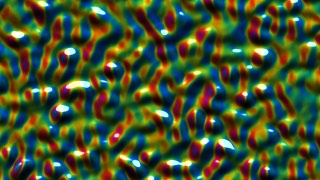
Bubble space shaded with Shaded main gradient (Libraries/Components demo/22 Bubble space texture.artm)
 22 Facet space
ArtMatic script function :
parameters :
A : Scale (0.1 : 2.0)
B : Delta size (0.0 : 6.0)
C : Frequency (0.0 : 8.0)
discussion :
Create a multitude of irregularly-spaced tiles of the incoming space using Voronoi diagrams. Resulting space is discontinuous.
'Scale' affects the size of coordinates within each facet while 'Frequency' sets the period of the facet non periodic texture. "Delta size" adjust how much facets coordinates are randomized in scale. Large values provide a great variation of sizes.
See also the 24 XYza Voronoi tiles that offers more options of shapes and shadings.
 22 Facet space mirrors
ArtMatic script function :
parameters :
A : Scale (0.125 : 2.0)
B : Delta size (0.0 : 6.0)
C : Frequency (0.0 : 8.0)
discussion :
Similar to "Facet space" this component creates random facets/tiles using Voronoi diagrams but uses symmetrical space for each cells. The transitions between the facets is smooth which makes it a great tool for creating natural semi-random textures. 'Scale' affects the size of coordinates within each facet while 'Frequency' sets the period of the facet non periodic texture. 'Delta size' adjust how much facets coordinates are randomized in scale.
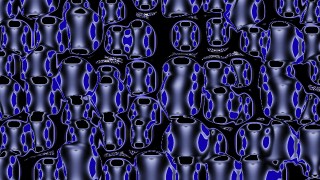
Facet space mirrors shaded with U & I logo
 22 Facet space rotate
ArtMatic script function :
parameters :
A : Delta angle (0.0 : 6.283)
B : Delta size (0.0 : 6.0)
C : Frequency (0.0 : 8.0)
discussion :
Similar to the Facet Space component but each cell is randomly rotated. The "Delta Angle" parameter controls the amount of random rotation.
 22 Compiled tree (Subtree)
ArtMatic script function :
parameters :
A : Blend (0.0 : 1.0)
B : Recursions # (0 : 256) integer
discussion :
Compiled trees are groups of tiles that can be used in place of single tiles as a kind of macro or subroutine. 22 CTs can hold groups of 2D space transformations or can be used to manipulate 2 parallel streams of datas : scalar single values (1D), 3D or 4D packed vectors.
usage :
Select a 22 tile and use "New compiled tree" to create a new CT from the selection (Tree Edit menu or type 'n' key).
To save a CT on disk to use the function elsewhere use "Save compiled tree" from the Tree Edit menu.
You may also copy and paste the entire CT by using Copy Tile and Paste Tile from the Edit menu.
22 CT can be used recursively if the option "Allow feedback" is set. In that case output is fed to the input at second iteration and the transform will be applied N times, N being set by the "Recursions" parameter. Recursions over 2D space transforms provide a simple and efficient way to generate 2D fractals.
22 CT allows recursion with feedback ON with packed RGBA streams as well as scalar input/outputs. The types of ins and outs has to match for the feedback to function properly. If ins and outs are packed RGBA, a 22 CT can process 8 values. This vector usage of 22 CT is often needed for plant design where each level has to send both transformed space coordinates and textured DF RGBA data to the next. Examples can be found in Voyager Library/3D Models/DF Plants folder.
Starting E9 it can accept packed data in any input slot if the corresponding output slot is packed as well.